Instructors: Mark Collins (mark@proxyarch.com) Toru Hasegawa (toru@proxyarch.com)
Lab: Vector Mathematics
key concepts: Construction, Translating + Rotation, Dot Product , Cross ProductIn this tutorial, we will be looking at the different means available to us to not only move objects through space, but to query the angles between objects and describe perpendicular relationships between vectors.
Vectors are useful for:
The Basic Structure of a Processing Application
Part 1: Vector Construction
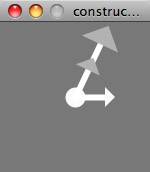
Link to Processing Applet here.
Commands used: PVector(), mag(), normalize()
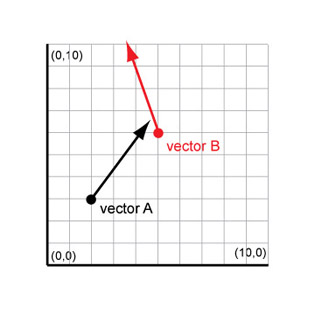
The information we usually have about any given object is its XYZ location. By using two points, an origin and a goal, we can 'construct' a vector that describes the trajectory that will bring one to the other. By converting this number to a 'unit' vector, we strip out the magnitude of the vector (how long it is) and create a simple ratio (from 0-1) of each of the X, Y and Z components. This is accomplished by dividing each constituent (delta X, delta Y, delta Z) by the total length of the vector. The unit vector will be used in translation, as well as finding angles between vectors and computing normals.
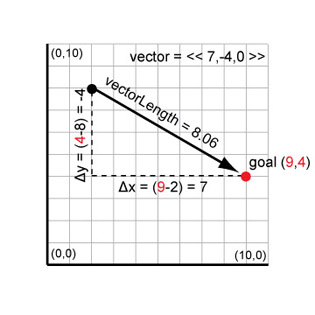
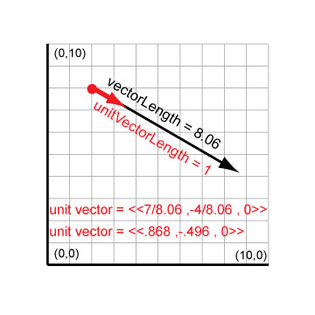
Constructing vectors from two points
Part 2: Vector Translation
Once we have determined our "unit vector", moving our object toward our goal along our movement vector can occur at any "speed". By multiplying the amount we want to move (say for instance 3 units) and multiplying this amount by each constituent of the unit vector, we can get simple deltaX deltaY and deltaZ values for translation.
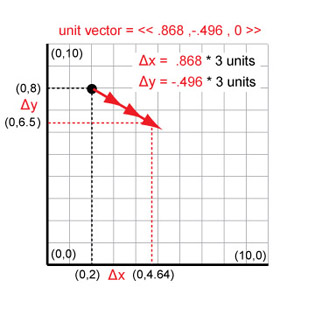
Translating a Vector
Part 3: Dot Product
Commands used: PVector(), dot(), acos()
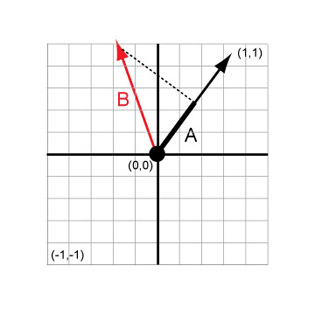
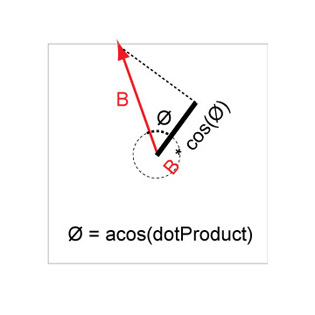
The dot product of two vectors is essentially one vector mapped to the other vector - it computes alignment of vectors. If their vectors are moving in the same direction, the dot product will be 1. If the vectors are perfectly perpendicular, the value will be 0. We can use the dot product to easily find the angles between two vectors, simply by using the arc-cosine function. The lower-right image below attempts to describe this trigonometric relationship between a vector and its corresponding 'mapping' onto another vector. Ultimately, we are multiplying constituents of each vector by each other and adding them up to form a ratio of how aligned they are (i.e. if deltaX of vector 1 and deltaX of vector 2 are similar, they will result in a high number, but if one is 0, their result, no matter how large the other number is, would be 0).
Constructing vectors from two points
Part 4: Cross Product
Commands used: PVector(), cross()
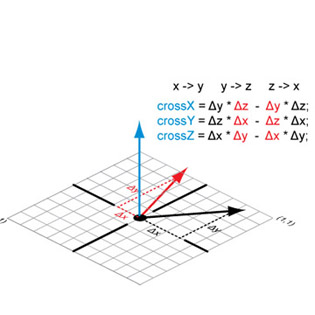
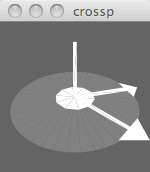
The cross product is useful in defining a perpendicular of two vectors. For our purposes this is useful in defining a normal direction, such as in the case of a polygonal face. By computing the cross product of two edges of a face, we can find the direction that it is facing. We can use this for extrusion, to calculate how light would interact with it, or to move objects away or toward the face.
Cross products are always perpendicular to the plane defined by two vectors. The length of the cross product will shrink depending on the angle between the vectors. Normalizing it returns it to unit length.
Constructing vectors from two points